

Every organization we work with has already met AI. Leadership has tested the chat tools, seen the demos, and felt the pull of a tool that promises overstretched teams their time back. The tools are capable. Adoption still stalls. The reason is location: the model lives somewhere your team has to leave their work to reach it. Real employee AI productivity depends less on the model and more on where it sits.
When AI sits in a separate tab, using it becomes one more task on top of the work. People open it once, forget it by Thursday, and go back to asking the colleague two desks over. The pattern looks different in every organization, and it costs the same thing everywhere: staff hours spent retrieving answers that already exist somewhere.
- A lean nonprofit team loses mission hours whenever a staffer hunts for an internal answer the donor’s gift was meant to fund.
- On a campus, advisors and registrars answer the same questions hundreds of times a term, while those answers sit in a system no one wants to open.
- In a credit union, a slow or wrong policy answer carries regulatory weight, so a lookup that should take seconds turns into careful minutes.
- In a state agency, employees email HR about a case they filed elsewhere, call IT to find the right form, and wait days for answers a good system could return at once.
Then there is the cost model, which most teams discover only after they commit. Standalone AI chat applications priced on token consumption bill you for every interaction. A single routine request can burn thousands of tokens on overhead the user never sees, and the meter runs whether the answer helped or not. At one desk, that is a rounding error. Across hundreds or thousands of employees, it becomes a budget line that moves every month and a forecast no finance team can hold. AI that grows your costs faster than your productivity becomes a subscription you will eventually question.
Where the friction actually goes away
The fix is to put AI inside the place where work already happens. Slack is where many teams already talk, decide, and coordinate, and its native intelligence turns that space into something useful without asking anyone to learn a new tool. Slack AI answers questions from your own conversations and files, summarizes long threads, and recaps the channels you missed, all inside the app people keep open anyway.
What Slackbot does now
Slackbot has moved well past the reminder helper it started as. As of the March 2026 update, it is a central work interface with more than 30 AI capabilities. It transcribes meetings at the desktop level across any video provider and logs the action items. It follows you across the desktop to help inside whatever app you have open. As a Model Context Protocol client, it routes tasks out to thousands of connected apps and to Agentforce, so one assistant inside Slack acts across your other systems. Its reusable Skills let a team teach it a task once and have any member reuse it, so knowledge compounds across the workforce. The core agentic features went live in January 2026 for Business+ and Enterprise+, with limited Free and Pro access from April 2026.
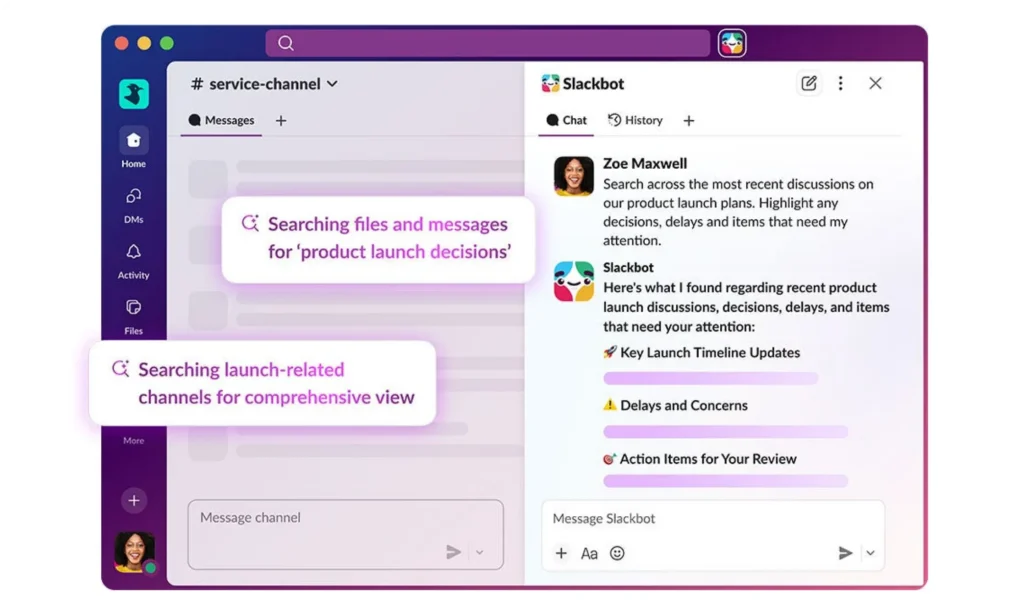
Agentforce takes that further, bringing autonomous agents into the same Slack workspace to route requests, generate documents, and move a process forward inside the conversation people are already having.
What makes this different
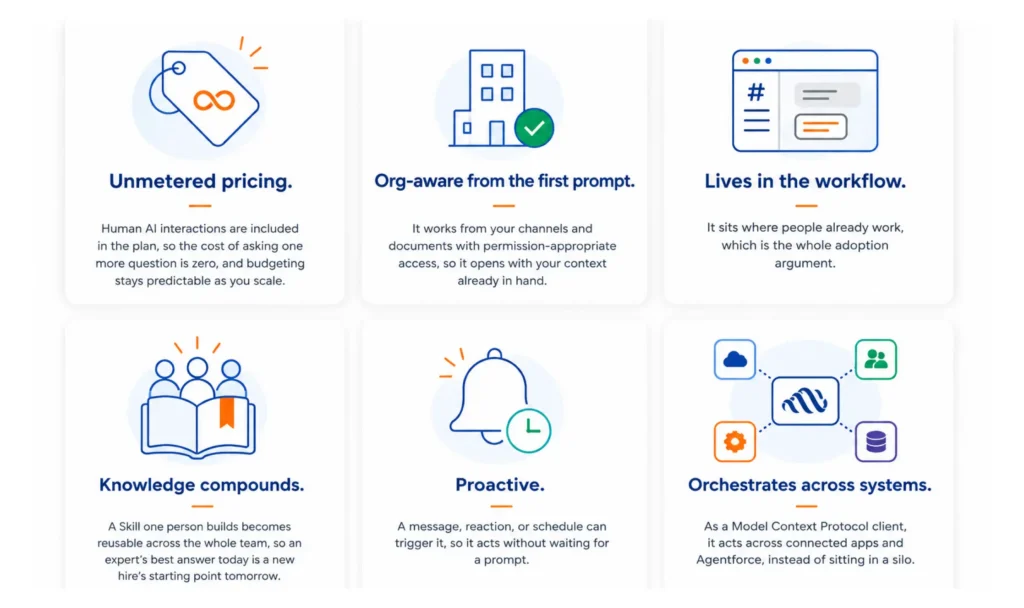
The advantage is architectural. What surrounds the model does the work: context, workflow, governance, and reuse. That is the line between AI people are allowed to use, and AI people reach for on their own. Six properties make the difference.
- Unmetered pricing. Human AI interactions are included in the plan, so the cost of asking one more question is zero, and budgeting stays predictable as you scale.
- Org-aware from the first prompt. It works from your channels and documents with permission-appropriate access, so it opens with your context already in hand.
- Lives in the workflow. It sits where people already work, which is the whole adoption argument.
- Knowledge compounds. A Skill one person builds becomes reusable across the whole team, so an expert’s best answer today is a new hire’s starting point tomorrow.
- Proactive. A message, reaction, or schedule can trigger it, so it acts without waiting for a prompt.
- Orchestrates across systems. As a Model Context Protocol client, it acts across connected apps and Agentforce, instead of sitting in a silo.
Public sector organizations show the shape of this at scale. Amtrak pulled scattered applications into a single Salesforce-powered workspace, giving employees a role-based experience in place of a tab-switching scavenger hunt. The Defense Digital Service runs on Slack for secure collaboration, which tells you agencies operating at the highest security bar trust it as an operational platform. Different missions, one lesson: when the tools and the answers live where people already work, the friction that stalls adoption stops being the story.
Where to start
This is why we position Slack as the primary employee AI productivity layer for the organizations we serve. It is the place your team already opens, made intelligent, priced so budgeting stays predictable as you scale, and open enough that the AI you invest in today connects to whatever you add tomorrow. By now, the question of whether to invest in AI has answered itself. What remains is where to begin. Begin where your people already work.
Cloud for Good helps mission-driven organizations put Salesforce and Slack to work for the people they serve. Let’s talk.